English
Add to Chrome
  1. Simlord
  2. iPhone simulator

An iPhone simulator for your website, right in Chrome

Simlord shows the site you're working on the way an iPhone shows it, with the exact viewport, Safari's toolbars, the notch or Dynamic Island and touch. It runs in Chrome on Windows, macOS, Linux and ChromeOS, so you don't need a Mac, Xcode or a drawer full of phones.

Add to Chrome, it's freeWorks in Chrome, Edge and Brave. No account needed.

Simlord runs in Chrome on a computer. Open this page there to add it.
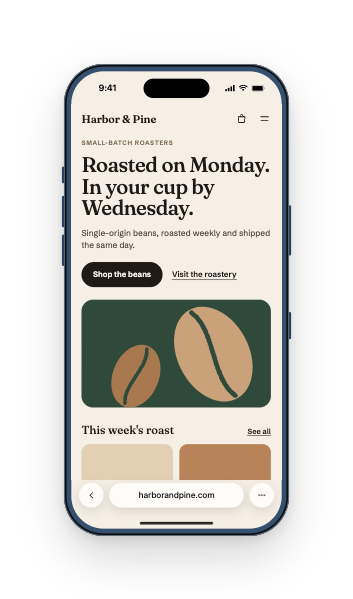
harborandpine.com shown on iPhone 17 Pro

Test your site on an iPhone in three steps

  1. Add Simlord to Chrome

    It's free and needs no account. Pin it, so the icon is always one click away.

  2. Open your site and click the icon

    Any page works, including localhost and staging sites behind a login. Your cookies and sessions stay as they are.

  3. Pick an iPhone

    Choose a model from the strip at the bottom, rotate it, and scroll and tap with your mouse as if it were your finger.

iPhones you can test on

Each model has the viewport, pixel ratio and user agent of the real phone. Open a model for all its sizes.

DeviceViewportPixel ratioScreen resolutionReleased
iPhone 18 ProPRO402 × 87431206 × 26222026
iPhone 18 Pro MaxPRO440 × 95631320 × 28682026
iPhone 17ePRO390 × 84431170 × 25322026
iPhone 17PRO402 × 87431206 × 26222025
iPhone 17 ProPRO402 × 87431206 × 26222025
iPhone 17 Pro MaxPRO440 × 95631320 × 28682025
iPhone AirPRO420 × 91231260 × 27362025
iPhone 16ePRO390 × 84431170 × 25322025
iPhone 16393 × 85231179 × 25562024
iPhone 16 Plus430 × 93231290 × 27962024
iPhone 16 Pro402 × 87431206 × 26222024
iPhone 16 Pro Max440 × 95631320 × 28682024
iPhone 15393 × 85231179 × 25562023
iPhone 15 Plus430 × 93231290 × 27962023
iPhone 15 Pro393 × 85231179 × 25562023
iPhone 15 Pro Max430 × 93231290 × 27962023
iPhone 14 Plus428 × 92631284 × 27782022
iPhone 14390 × 84431170 × 25322022
iPhone 14 Pro393 × 85231179 × 25562022
iPhone 14 Pro Max430 × 93231290 × 27962022
iPhone SE (3rd gen)375 × 6672750 × 13342022
iPhone 13390 × 84431170 × 25322021
iPhone 13 Pro390 × 84431170 × 25322021
iPhone 13 Pro Max428 × 92631284 × 27782021
iPhone 13 mini375 × 81231125 × 24362021
iPhone 12 Pro Max428 × 92631284 × 27782020
iPhone 12 mini375 × 81231125 × 24362020
iPhone 12390 × 84431170 × 25322020
iPhone 12 Pro390 × 84431170 × 25322020
iPhone SE (2nd gen)375 × 6672750 × 13342020
iPhone 11414 × 8962828 × 17922019
iPhone 11 Pro375 × 81231125 × 24362019
iPhone 11 Pro Max414 × 89631242 × 26882019

PROThe newest phones and tablets, from 2025 onward

Why a narrow window isn't an iPhone

Making a desktop window 402 pixels wide shows you a narrow page, not an iPhone. On the phone, Safari's address bar and toolbar take room, the status bar and Dynamic Island cover the top, and the home indicator sits at the bottom. A button that looks above the fold in a narrow window can end up behind those bars.

Simlord draws the bars where Safari draws them and leaves the page the room that is really left over, in portrait and in landscape.

Touch and an iPhone identity

Dragging with the mouse scrolls with momentum and clicks become taps, without hover. Hover and pointer media queries answer like a touchscreen, and the page gets the iPhone's user agent, so sites that serve a separate mobile layout or detect touch behave as they do on a real iPhone.

What it can't do

Simlord renders pages with Chrome's engine, not Safari's WebKit. Sizes, bars and identity match the iPhone, but a bug that only WebKit has won't show up. Check those on a real iPhone, or in Xcode's Simulator on a Mac, before you ship.

Questions

Something else? Write to support@simlord.eu.

Do I need a Mac to simulate an iPhone?

No. Simlord runs in Chrome on Windows, macOS, Linux and ChromeOS. Apple's own Simulator comes with Xcode and only runs on a Mac.

Which iPhones are included?

Every iPhone from the iPhone 11 to the newest models, including the SE, mini, Plus, Pro Max and Air sizes. The table above lists them with their viewports.

Can I test my site in landscape?

Yes. Rotate the iPhone and Simlord switches to the landscape viewport, with the bars where Safari puts them in landscape.

Is it the same as testing in Safari?

It shows the iPhone's screen, toolbars and user agent, but pages render with Chrome's engine. Check WebKit-specific bugs on a real device too.

Does it work on pages behind a login?

Yes. The page opens in the same tab, so your cookies, sessions and saved data keep working.

Try it on your own site.

Free, no account needed. Works in Chrome, Edge and Brave.

Simlord runs in Chrome on a computer. Open this page there to add it.