English
Add to Chrome
  1. Simlord
  2. Foldable simulator

Test your website on foldable phones, folded and unfolded

A foldable is two devices in one. Folded it's a narrow phone, unfolded it's almost square, and your site has to work on both. Simlord shows your page on the Galaxy Z Fold, Galaxy Z Flip, Pixel Fold and more, and switches between the cover screen and the main screen in a click.

Add to Chrome, it's freeWorks in Chrome, Edge and Brave. No account needed.

Simlord runs in Chrome on a computer. Open this page there to add it.
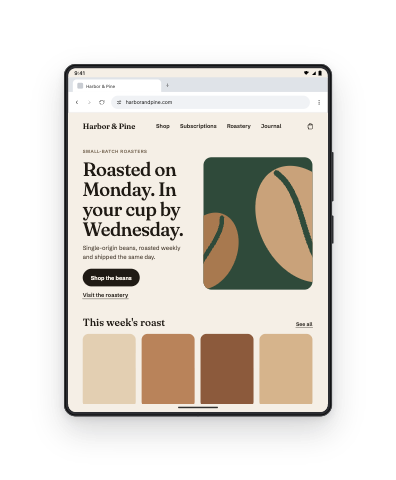
harborandpine.com shown on Galaxy Z Fold8

Test a foldable in three steps

  1. Add Simlord to Chrome

    It's free, and you don't need a foldable on your desk.

  2. Open your site and choose Foldables

    The foldables have their own group in the device strip.

  3. Fold and unfold

    Switch between the cover screen and the main screen, and rotate each of them.

Foldables you can test on

Each foldable has its main screen and, where it has one, its cover screen. Open a model for both sets of sizes.

DeviceViewportPixel ratioScreen resolutionReleased
iPhone DuoPRO669 × 95132007 × 28532026
Pixel 11 Pro FoldPRO852 × 8832.43752077 × 21522026
Galaxy Z Flip8PRO360 × 84031080 × 25202026
Galaxy Z Fold8PRO704 × 9332.6251848 × 24492026
Galaxy Z Fold8 UltraPRO752 × 83532256 × 25052026
Pixel 10 Pro FoldPRO852 × 8832.43752077 × 21522025
Galaxy Z Flip7PRO360 × 84031080 × 25202025
Galaxy Z Flip7 FEPRO360 × 88031080 × 26402025
Galaxy Z Fold7PRO750 × 8322.6251969 × 21842025
Pixel 9 Pro Fold852 × 8832.43752077 × 21522024
Galaxy Z Flip6360 × 88031080 × 26402024
Galaxy Z Fold6708 × 8232.6251859 × 21602024

PROThe newest phones and tablets, from 2025 onward

Two screens, two identities

A Galaxy Z Fold's cover screen is a normal phone. Unfolded, Chrome on the Fold presents itself as a tablet and often gets the desktop site. Simlord switches the viewport and the identity together, so you see what visitors really get on each screen.

The square layout

Unfolded, a Fold is wider than most tablets in portrait and nearly square. Two-column layouts, centred content with a maximum width and full-screen images behave differently there than anywhere else, which is why it is worth a look before launch.

Questions

Something else? Write to support@simlord.eu.

Which foldables are included?

The Samsung Galaxy Z Fold and Z Flip generations, Google's Pixel Fold models and the other foldables listed above.

Can I see the cover screen?

Yes. Foldables with a cover screen can be folded and unfolded in the simulator.

Do I need to own a foldable?

No. Simlord uses each foldable's real sizes and user agent, in Chrome on your computer.

Try it on your own site.

Free, no account needed. Works in Chrome, Edge and Brave.

Simlord runs in Chrome on a computer. Open this page there to add it.