English
Add to Chrome
  1. Simlord
  2. iPad simulator

See your website on every iPad, in Chrome

Tablets are where many layouts break, halfway between phone and desktop. Simlord shows your site on the iPad, iPad mini, iPad Air and iPad Pro, in portrait and landscape, with Safari's tablet toolbar, on any computer with Chrome.

Add to Chrome, it's freeWorks in Chrome, Edge and Brave. No account needed.

Simlord runs in Chrome on a computer. Open this page there to add it.
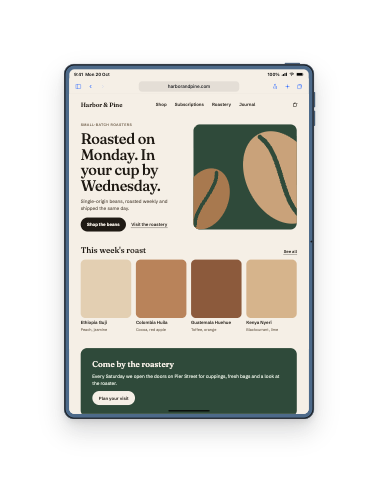
harborandpine.com shown on iPad Air 11"

Test your site on an iPad

  1. Add Simlord to Chrome

    Free, with no account. It works on Windows, macOS, Linux and ChromeOS.

  2. Open your site and click the icon

    The page opens in the simulator in the same tab, logged in as you are.

  3. Pick Tablets and choose an iPad

    Rotate it to landscape to see the layout most iPad users read in.

iPads you can test on

From the iPad mini to the 13-inch iPad Pro, each with its real viewport and pixel ratio. Open a model for all its sizes.

DeviceViewportPixel ratioScreen resolutionReleased
iPad Air 11" (M4)PRO820 × 118021640 × 23602026
iPad Air 13" (M4)PRO1024 × 136622048 × 27322026
iPad Pro 11" (M5)PRO834 × 121021668 × 24202025
iPad Pro 13" (M5)PRO1032 × 137622064 × 27522025
iPad (A16)PRO820 × 118021640 × 23602025
iPad Air 11" (M3)PRO820 × 118021640 × 23602025
iPad Air 13" (M3)PRO1024 × 136622048 × 27322025
iPad mini (A17 Pro)744 × 113321488 × 22662024
iPad Air 11" (M2)820 × 118021640 × 23602024
iPad Air 13" (M2)1024 × 136622048 × 27322024
iPad Pro 11" (M4)834 × 121021668 × 24202024
iPad Pro 13" (M4)1032 × 137622064 × 27522024
iPad (10th gen)820 × 118021640 × 23602022
iPad (9th gen)810 × 108021620 × 21602021

PROThe newest phones and tablets, from 2025 onward

The sizes between your breakpoints

An iPad in portrait is often just above a phone breakpoint, and in landscape just below a desktop one. Menus that collapse too early, grids with one lonely column and images that stretch show up exactly there.

Switch between the iPad mini, Air and Pro to check every width, then rotate each of them.

A tablet that asks for the desktop site

Since iPadOS 13, Safari on an iPad asks for the desktop version of a site and presents itself as a Mac. Simlord sends the same user agent, so your site makes the same choice it makes for real iPad visitors.

Questions

Something else? Write to support@simlord.eu.

Can I simulate an iPad on Windows?

Yes. Simlord runs in Chrome on Windows, macOS, Linux and ChromeOS.

Which iPads are included?

The iPad, iPad mini, iPad Air and iPad Pro generations listed above, each with its own viewport.

Does it show landscape?

Yes. Rotate the iPad and the viewport, toolbar and status bar switch to landscape.

Why does my site show its desktop layout on the iPad?

Because Safari on an iPad asks for desktop sites, just like Simlord does. Use the view options to request the mobile website if you want to compare.

Try it on your own site.

Free, no account needed. Works in Chrome, Edge and Brave.

Simlord runs in Chrome on a computer. Open this page there to add it.