English
Add to Chrome
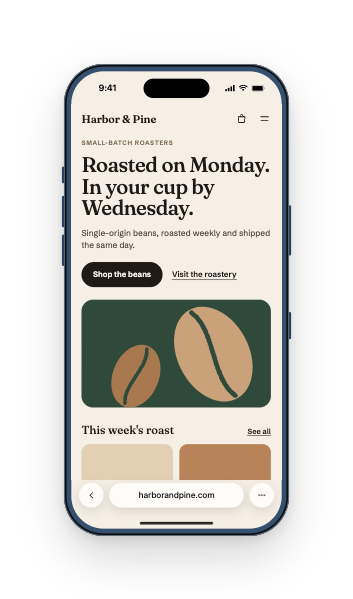
Simlord showing a coffee shop's website on an iPhone 17 Pro
Now showing
iPhone 17 Pro402 × 874 · Safari

See your site the way phones see it.

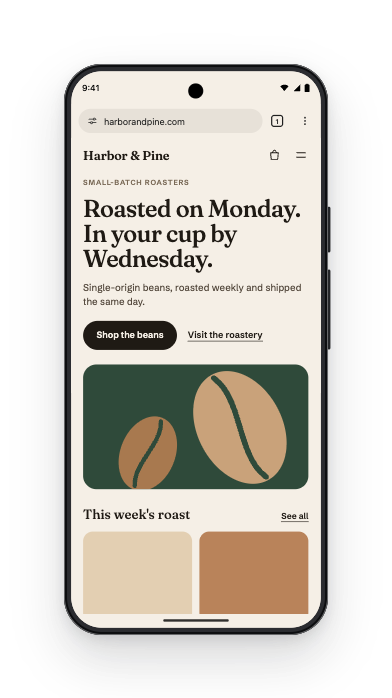
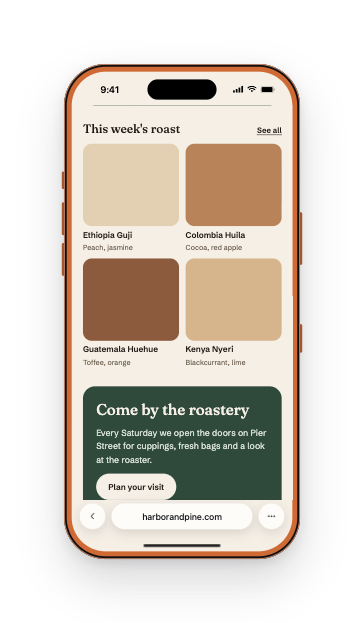
Simlord shows any website on current iPhones, Pixels, Galaxys, iPads and foldables, with touch, browser bars and the right user agent. Your logins, cookies and saved data keep working.

Add to Chrome, it's freeWorks in Chrome, Edge and Brave. No account needed.

Simlord runs in Chrome on a computer. Open this page there to add it.

Devices
133
Languages
9
PRO for life
€10
PRO

Compare side by side

Up to four devices at the same scale, with scrolling and navigation kept in sync.

See what PRO adds

How it works

Pin Simlord, open your site and click the icon. Then pick a device.

Free, no account needed

Your pages stay in your browser

Simulation, screenshots and recordings all happen on your computer. Nothing you test is uploaded, and the free version sends us nothing at all.

Read the privacy policy
RecordingsMP4, WebM or GIF, with touches visible
Saved on your computerPNGMP4GIFWEBM

What you can do

Testing your site is free. PRO adds the newest phones and tablets, comparing, full pages and longer recordings.

  • iPhone 17 Pro402 × 874
  • Pixel 10 Pro412 × 919
  • Galaxy Z Flip8360 × 840
  • Galaxy Z Fold8704 × 933
  • iPad Air 11"820 × 1180

Current phones and tablets

133 devices

iPhone, Pixel, Galaxy, iPad and foldables with their exact screen sizes, plus your own custom sizes.

Touch, not a mouse

Drag to scroll, tap targets and a mobile user agent, so your site behaves like it does on a phone.

Real browser space

Status bar and Safari or Chrome toolbars take their real space, so you see what's above the fold.

Screenshots with a device frame

Transparent PNGs at full resolution, ready for a presentation or a client email.

  • iPhone 17 Pro402 × 874
  • Pixel 10 Pro412 × 919
  • Galaxy S26 Ultra384 × 832
  • iPhone Air420 × 912
Sync scroll, navigation and clicks

Compare side by side

PRO

Up to four devices at the same scale, with scrolling and navigation kept in sync.

Pay once, keep it for life

Testing your site is free. PRO adds the newest phones and tablets, comparing, full pages and longer recordings, for one payment including VAT.

Upgrade from inside Simlord whenever you like. Pay with iDEAL, card or Bancontact.

Free€0forever
  • Every device except the newest phones and tablets
  • Touch simulation and browser toolbars
  • Screenshots of the visible screen
  • Recordings up to 30 seconds
  • One custom device
PRO€10once, yours for life
  • Everything in Free
  • The newest phones and tablets, from 2025 onward
  • Compare up to four devices side by side
  • Full-page screenshots
  • Unlimited recordings in 4K and GIF
  • Unlimited custom devices, synced across browsers

Questions

Something else? Write to support@simlord.eu.

Does Simlord send my pages anywhere?

No. Simulation, screenshots and recordings all happen in your browser. We only keep the email address of PRO buyers, for the licence and the invoice.

Which browsers does it work in?

Chrome, Edge, Brave and other browsers built on Chromium, version 137 or newer, on Windows, macOS, Linux and ChromeOS.

Is PRO a subscription?

No. You pay €10 once, including VAT, and keep PRO for life, with every future update.

Can I use PRO on more than one computer?

Yes. Sign in with the email you bought PRO with on every browser where you want it. We send you a code, no password needed.

Can I get my money back?

No. PRO starts the moment you pay, so when you buy it you give up the 14-day right of withdrawal. Something wrong with a payment? Write to support@simlord.eu.

Is this the same as testing on a real phone?

Simlord gives each device its screen size, pixel density, touch, browser bars and user agent. Pages still render with Chrome's own engine, so check engine-specific bugs on a real device too.

Try it on your own site.

Free, no account needed. Works in Chrome, Edge and Brave.

Simlord runs in Chrome on a computer. Open this page there to add it.