English
Add to Chrome
  1. Simlord
  2. Android emulator for websites

Test your website on Android phones without Android Studio

You don't need a full Android emulator to see how your site looks on a Pixel or a Galaxy. Simlord shows your page on current Android phones in the tab you're already in, with Chrome's Android toolbar, touch and the phone's own user agent.

Add to Chrome, it's freeWorks in Chrome, Edge and Brave. No account needed.

Simlord runs in Chrome on a computer. Open this page there to add it.
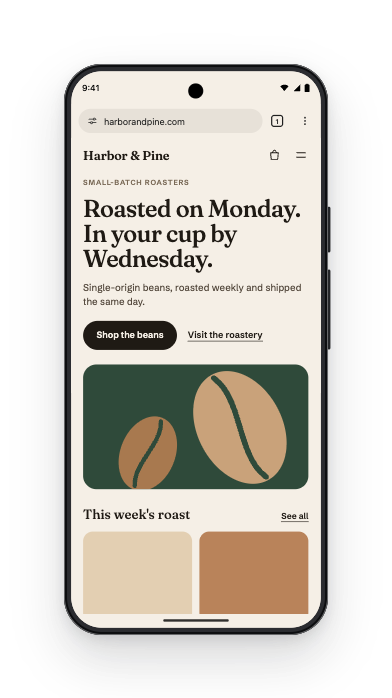
harborandpine.com shown on Pixel 10 Pro

Check your site on Android in three steps

  1. Add Simlord to Chrome

    It's free and installs in seconds. There's no system image to download and nothing to boot.

  2. Open your site

    Click the Simlord icon on any page, also on localhost or a staging site behind a login.

  3. Choose a Pixel or a Galaxy

    Pick a phone from the strip, switch between them in a click, and rotate to check landscape.

Android phones you can test on

Each phone has its real viewport, pixel ratio and Chrome user agent. Open a phone for all its sizes and its Client Hints.

DeviceViewportPixel ratioScreen resolutionReleased
Pixel 11PRO412 × 9242.6251082 × 24262026
Galaxy A27 5GPRO384 × 8322.81251080 × 23402026
Galaxy A37 5GPRO384 × 8322.81251080 × 23402026
Galaxy A57 5GPRO384 × 8322.81251080 × 23402026
Galaxy S26PRO360 × 78031080 × 23402026
Galaxy S26 UltraPRO384 × 8322.81251080 × 23402026
Galaxy S26+PRO384 × 8322.81251080 × 23402026
Pixel 10aPRO412 × 9242.6251082 × 24262026
Galaxy A17PRO384 × 8322.81251080 × 23402025
Galaxy S25 FEPRO384 × 8322.81251080 × 23402025
Pixel 10PRO412 × 9242.6251082 × 24262025
Pixel 10 ProPRO412 × 9192.6251082 × 24122025
Pixel 10 Pro XLPRO444 × 9872.43751082 × 24062025
Galaxy A17 5GPRO384 × 8322.81251080 × 23402025
Galaxy S25 EdgePRO384 × 8322.81251080 × 23402025
Pixel 9aPRO412 × 9242.6251082 × 24262025
Galaxy A26 5GPRO384 × 8322.81251080 × 23402025
Galaxy A36 5GPRO384 × 8322.81251080 × 23402025
Galaxy A56 5GPRO384 × 8322.81251080 × 23402025
Xiaomi 15PRO370 × 8223.251203 × 26722025
Galaxy S25PRO360 × 78031080 × 23402025
Galaxy S25 UltraPRO384 × 8322.81251080 × 23402025
Galaxy S25+PRO384 × 8322.81251080 × 23402025
OnePlus 13PRO360 × 79231080 × 23762025
Galaxy A16384 × 8322.81251080 × 23402024
Galaxy A16 5G384 × 8322.81251080 × 23402024
Galaxy S24 FE384 × 8322.81251080 × 23402024
Pixel 9 Pro427 × 9522.25961 × 21422024
Pixel 9412 × 9242.6251082 × 24262024
Pixel 9 Pro XL448 × 9982.251008 × 22462024
Pixel 8a412 × 9152.6251082 × 24022024
Galaxy A35 5G384 × 8322.81251080 × 23402024
Galaxy A55 5G384 × 8322.81251080 × 23402024
Galaxy S24360 × 78031080 × 23402024
Galaxy S24 Ultra384 × 8322.81251080 × 23402024
Galaxy S24+384 × 8322.81251080 × 23402024
Galaxy A15384 × 8322.81251080 × 23402023
Galaxy A15 5G384 × 8322.81251080 × 23402023
Galaxy A25 5G384 × 8322.81251080 × 23402023
Pixel 8412 × 9152.6251082 × 24022023
Pixel 8 Pro448 × 9982.251008 × 22462023
Pixel 7a412 × 9152.6251082 × 24022023
Galaxy S23360 × 78031080 × 23402023
Galaxy S23 Ultra384 × 8242.81251080 × 23182023
Galaxy S23+384 × 8322.81251080 × 23402023
Pixel 7412 × 9152.6251082 × 24022022
Pixel 7 Pro412 × 8922.6251082 × 23422022

PROThe newest phones and tablets, from 2025 onward

A browser view, not a whole phone

An emulator in Android Studio runs the full operating system. That's what you need for an app, but for a website it means gigabytes of downloads, a slow boot and a second browser to log in to.

Simlord only does the part a website needs. It gives the page the phone's screen, its toolbar and its identity, in your own Chrome, with your own logins.

The identity sites look for

Sites tell phones apart by their user agent and, in Chrome, by Client Hints such as the platform and model. Simlord sends the ones the real phone sends, and can present itself as Samsung Internet instead of Chrome when that's what your visitors use.

When you still need a real device

Simlord renders with your desktop Chrome, so it shows how layouts, bars and touch behave, not how fast a mid-range phone runs your JavaScript. Test performance on a real device.

Questions

Something else? Write to support@simlord.eu.

Is this a real Android emulator?

No. It simulates the phone's browser, not the whole operating system. For a website that is usually what matters, and it starts instantly.

Which Android phones are included?

Current Pixel, Samsung Galaxy, OnePlus and Xiaomi phones, with Galaxy foldables in their own group. The table above lists them with their viewports.

Can I test with Samsung Internet?

Yes. In the view options you can switch the user agent of a Samsung phone to Samsung Internet.

Does it need Android Studio or a fast computer?

No. Simlord is an extension in Chrome; there is nothing else to install.

Try it on your own site.

Free, no account needed. Works in Chrome, Edge and Brave.

Simlord runs in Chrome on a computer. Open this page there to add it.